🔧 INSTALLER LEVEL: Source Integration and Signal Chain
USB Drive Best Practices
This page is meant to include a finished diagram or annotated reference visual. The final asset is not published yet.
Planned visual: Screenshot of computer file browser showing organized FLAC music library with artist/album folder structure, alongside a USB drive and head unit
Drive requirements:
- Format: FAT32 or exFAT. Most head units don't support NTFS. FAT32 max file size: 4 GB (fine for music, not video). exFAT: No size limit, modern head units support it.
- Speed: USB 3.0 drive preferred, though audio doesn't need speed — seek time for track changes matters more than throughput.
- Size: 128–512 GB covers most music libraries. 1 TB available if needed.
File organization:
Most head units browse by folder structure:
/Music
/Artist Name
/Album Name (Year)
01 - Track Name.flac
02 - Track Name.flac
folder.jpg ↠album art
Embedded metadata: Use a tag editor (Mp3tag for Windows, Kid3 for Mac/Linux) to ensure all files have proper Artist, Album, Track Number, and Title tags. Head units use these for library browsing views.
Album art: Embed cover art into FLAC/MP3 tags AND include a folder.jpg file. Some head units use one, some use the other.
Common USB problems:
| Problem | Cause | Fix |
|---|---|---|
| "No music found" | Wrong format (NTFS) or empty folders | Reformat as exFAT, re-copy |
| Tracks skip | USB drive too slow or failing | Replace drive |
| No album art | Art not embedded or wrong filename | Use Mp3tag to embed |
| Slow track browsing | Too many files in root | Organize into folders |
| Playlist not working | Wrong M3U format | Re-create relative-path M3U |
DAC Quality and Its Impact
The Digital-to-Analog Converter is where digital audio becomes the analog voltage your amplifier needs. Head unit DAC quality varies enormously.
Key DAC specifications:
SNR (Signal-to-Noise Ratio): Distance between signal and noise floor. 100 dB is adequate; 110+ dB is excellent. Below 95 dB produces audible hiss.
THD+N (Total Harmonic Distortion + Noise): How cleanly the DAC converts. <0.01% is excellent; <0.001% is reference quality.
Dynamic Range: Usually close to SNR. CD standard is 96 dB; a good DAC achieves 110–120 dB.
Frequency Response: Should be flat ±0.5 dB from 20 Hz to 20 kHz.
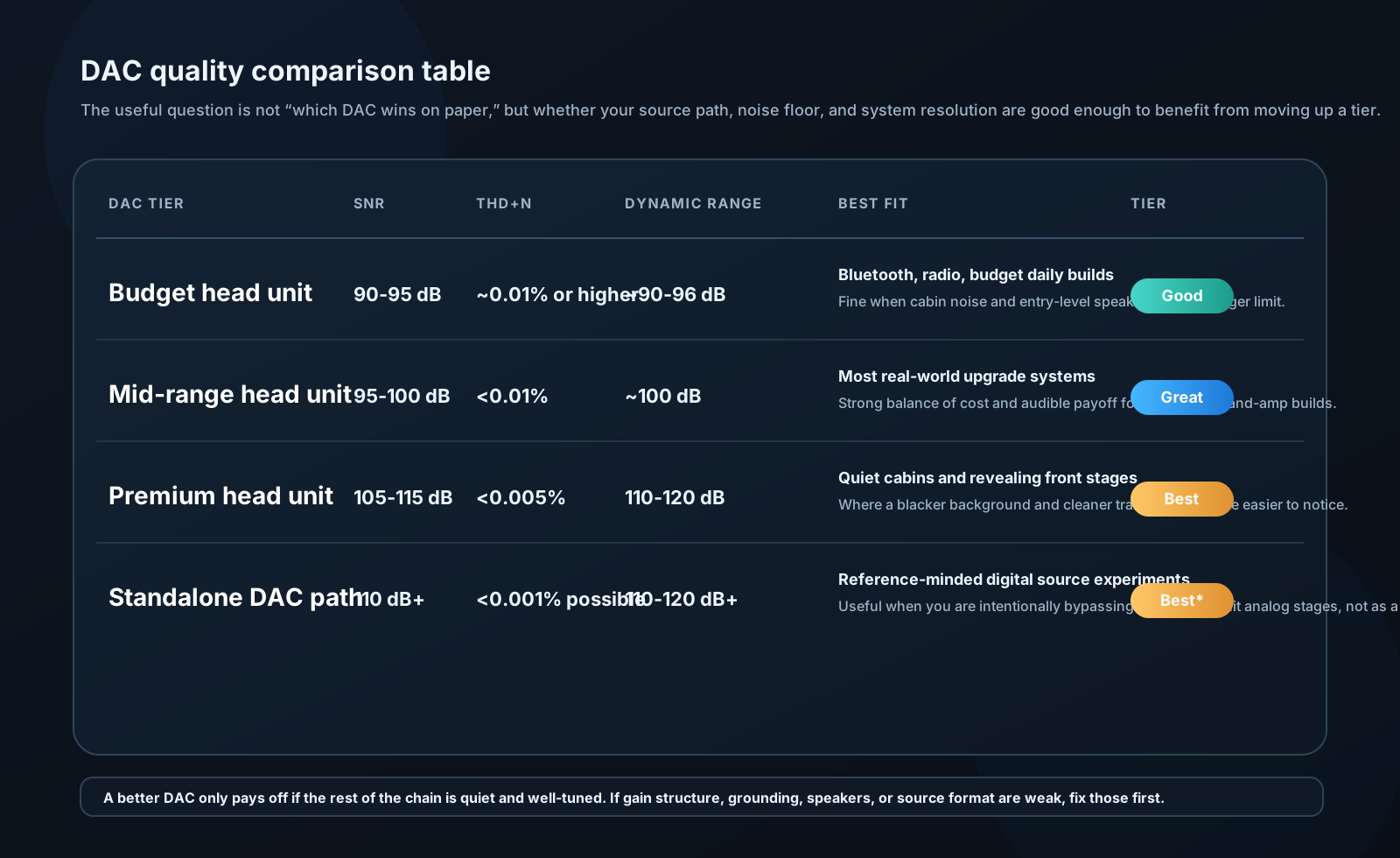
Budget head units: Typically use generic DAC chips (Realtek, generic). SNR 90–95 dB. Fine for Bluetooth or FM radio; shows its limitations with lossless sources.
Mid-range units: Better DAC implementations, 95–100 dB SNR. Suitable for most systems.
Premium units (Alpine, Denon, Pioneer Flagship): Use quality DAC ICs (Burr-Brown PCM5102A, AKM AK4458). SNR 105–115 dB. Audibly better black background on revealing systems.
Standalone DAC/preamp: For the highest performance, some builders bypass the head unit's DAC entirely. Phone → USB → standalone DAC (Topping D10, iFi micro iDAC) → RCA to DSP/amplifier. Head unit only provides control interface. This is relatively rare but represents the theoretical best for digital source quality.
Clock Jitter and Its Effects
Jitter is timing variation in the digital clock that controls D/A conversion. Instead of samples being converted at exactly regular intervals, they arrive slightly early or late.
Effect on sound:
Jitter modulates the audio signal:
Signal_output(t) = Signal_ideal(t + Δt_jitter)
This creates sidebands around each frequency at ±f_jitter. At high jitter levels, these sidebands become audible as harshness or a "glassy" quality on transients and high frequencies.
Jitter specification:
- <50 ps (picoseconds): Excellent, inaudible
- 50–200 ps: Good, barely noticeable on critical material
- 200 ps–1 ns: Audible on high-resolution systems
- >1 ns: Clearly audible on resolving systems
Sources of jitter in car audio:
- USB data transmission asynchronous timing
- Head unit clock oscillator quality
- Power supply noise modulating the clock
- Long USB cables with poor shielding
Mitigation:
- High-quality USB cable (short, well-shielded)
- Asynchronous USB mode (device controls clock, not host)
- External reclocker (rare in car audio but used in extreme SQ builds)
- Linear power supply for DAC (eliminates switching noise)