Tiny version
Match the sound you hear to the right first check before you start swapping parts.
Match the sound you hear to the right first check before you start swapping parts.
Use symptom-first cards and follow the branch that matches the sound. Good troubleshooting is mostly about not taking the wrong first step.
The detailed branches below still matter, but the top of the page should help you pick the right lane fast.
| Symptom | What it sounds like | Most Likely Cause | First Check |
|---|---|---|---|
| Whine rises and falls with RPM | Steady rising whine | Alternator ground loop | Ground connections |
| Clicking/popping at idle, faster at higher RPM | Ticking or sharp clicking | Ignition noise | RCA routing |
| Constant hiss from tweeters | Steady soft shhh | Amplifier noise floor | Gain setting |
| Loud thump when system turns on | Single thump on power-up | Amplifier pop, DC offset | Turn-on delay |
| Noise only when certain source active | Noise appears only on one input | Source device ground loop | LOC or isolation |
| Noise only at high volume | Crunch or spit only when loud | Amplifier clipping | Gain reduction |
| Crackling, intermittent | Broken, crackly, or intermittent sound | Bad connection | Inspect all connectors |
| Static from radio only | Radio-only static | FM tuner issue | Antenna connection |
Inline filters and quick isolators are not the first fix. Use them only after the grounding, routing, and charging-system basics are proven right.
Symptom: Whining tone, pitch rises and falls exactly with engine RPM. Present whenever engine runs. Audible even with no music playing (volume up, no source selected).
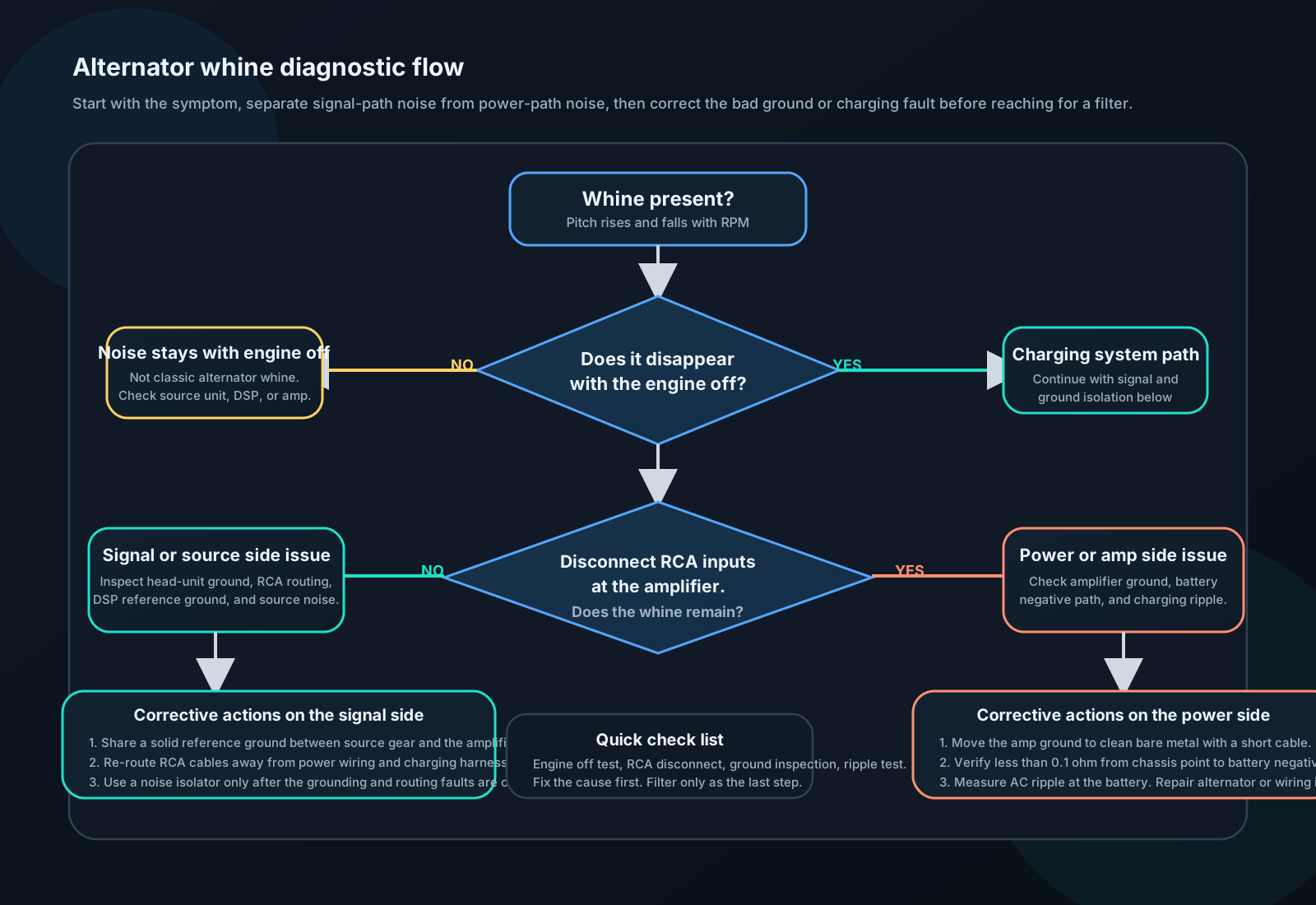
Root cause: Electrical ground loop. Two pieces of equipment are grounded at different points with different electrical potential. A small current flows through the RCA cable shield, creating a voltage that appears as an audio signal. The alternator's ripple frequency (300–900 Hz, proportional to RPM) modulates this.
Diagnostic steps:
Step 1: Confirm engine correlation Turn off engine. If whine disappears: alternator/electrical source confirmed. If whine persists with engine off: something else.
Step 2: Disconnect RCA cables at amplifier Leave amplifier on, RCAs disconnected. If whine disappears: noise is entering through RCA. If whine persists: noise is on the power lines or internal to amplifier.
Step 3: Check RCA ground loop The shield on the RCA carries ground noise. Unplug RCA at head unit end. If whine disappears: ground loop between head unit and amplifier.
Fix sequence (try in order):
Symptom: Popping, ticking, or clicking noise. Rate matches engine RPM or ignition cycle. Not a tone — more erratic than alternator whine.
Root cause: Electromagnetic interference from spark plug firing, ignition coil switching, or injector pulses radiating onto signal cables.
Diagnostic steps:
Step 1: Confirm RPM correlation Rev engine while listening. If noise frequency changes with RPM and sounds like ticking/popping rather than a tone: ignition noise.
Step 2: Check RCA routing RCA cables near ignition components (coil, spark plug wires, ECU)? Route to opposite side.
Step 3: Inspect spark plug wires Resistor plug wires required. Measure resistance of each wire — should be 1,000–3,000 Ω/foot. Zero or infinite: replace.
Fix sequence:
Symptom: Constant hissing sound from tweeters or midrange. Present even with no music playing and head unit volume at zero. Does not change with engine RPM.
Root cause: Amplifier internal noise floor, or gain set too high (amplifying the noise floor of the head unit or source).
Diagnostic:
Step 1: Turn head unit volume to zero. If hiss disappears: noise is from head unit preamp output. Gain too high.
Step 2: Disconnect RCA from amplifier. If hiss disappears: noise entering from source. Gain too high.
Step 3: If hiss persists with RCA disconnected: amplifier internal noise. Normal at very low levels; excessive if loud.
Fix:
Symptom: Loud thump from subwoofer and/or speakers when system powers on or off.
Root cause: DC offset transient from amplifier as power supply charges. Some amplifiers have poor muting circuits.
Fix sequence:
Products: AudioControl ACR (auto remote delay), generic 12V delay relay, most DSPs have programmable turn-on delay.
Ensure head unit turns off last — On turn-off: head unit should mute before amplifier loses power. If amplifier dies first: uncontrolled DC transient.
Check amplifier mute circuit — Some amps have a "mute" terminal. Connect to a delayed turn-on signal (via capacitor and resistor network: R=10kΩ, C=100μF → ~1s delay).
Replace amplifier — If pop is internal to amp and severe, the muting relay inside may be failed or the design is poor.